
The problem
A number that carriers start flagging as spam doesn’t announce itself, texts just quietly stop arriving, or a caller sees “Spam Likely” and doesn’t pick up. Without visibility into that, a team usually finds out from a frustrated customer who says they never got a message, long after the damage to that number’s reputation is done.
Spam and deliverability issues are one of the most widely requested fixes on GHL’s own ideas board, and GHL’s own documentation is upfront that STIR/SHAKEN and CNAM registration alone don’t remove spam labels. A number that gets flagged and stays flagged, unnoticed, can quietly drag down an entire sub-account’s texting and calling performance.
Number health gives an admin a place to see delivery trouble before it becomes a customer complaint, and an optional way to route around it automatically.
How it works in HighLevel
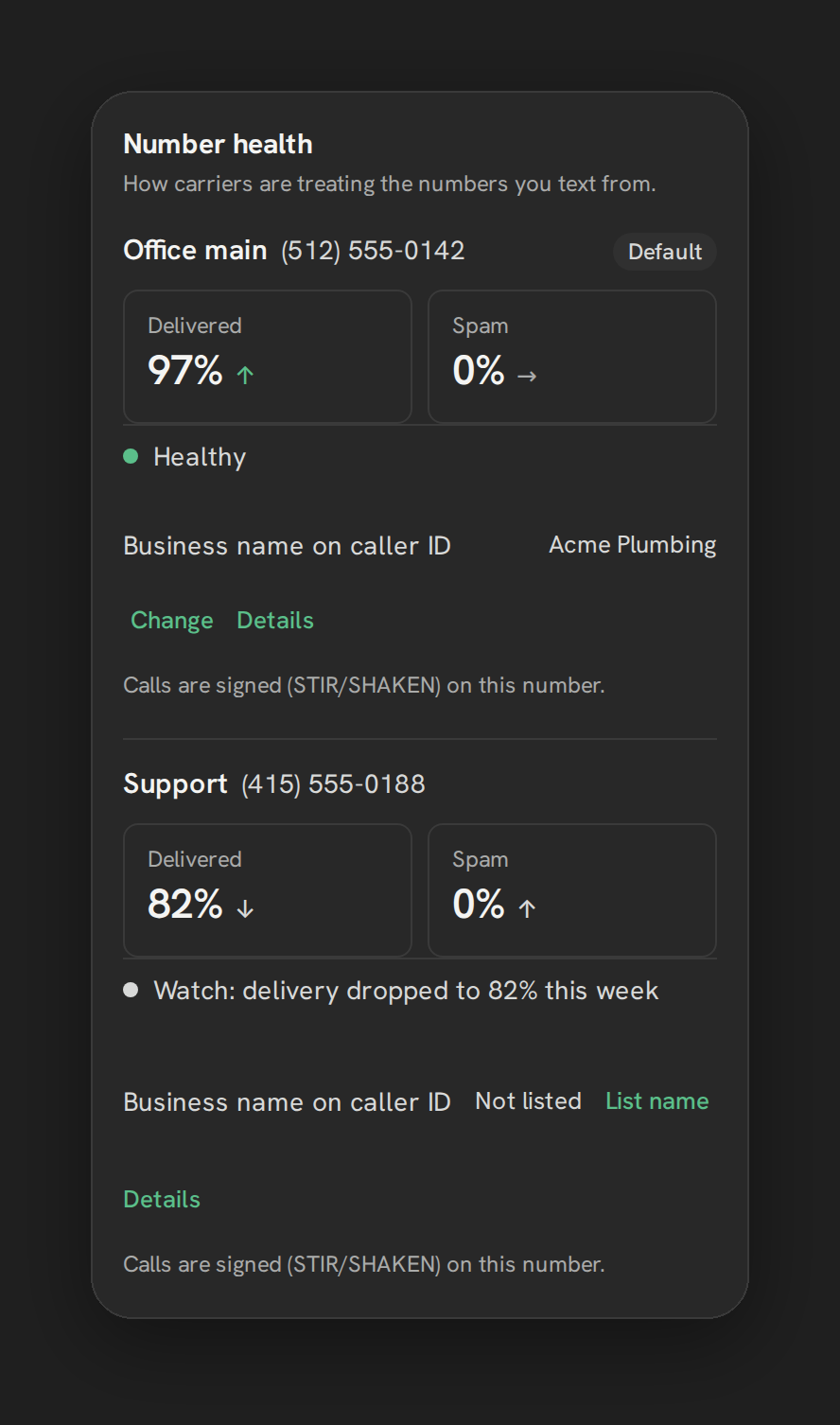
From Settings → Texting → “Number health,” each enabled number gets its own card. It shows Delivered and Spam tiles with a trend indicator, an overall status line, an optional note like “Paused automatically: <reason>” if auto-rotate has taken action, the CNAM (the caller-ID name carriers display), and whether STIR/SHAKEN signing, the industry standard for verifying caller ID, is active on that number.
A number is marked unhealthy when its spam ratio goes over 1%, or its success ratio drops below 85%, and only once at least 20 messages have been sent, so a brand-new number with light volume isn’t flagged prematurely. It becomes eligible to be marked healthy again after 72 hours of better behavior. When any number is unhealthy, a top-bar badge, an amber dot reading “Check number health,” appears across the app, polling every 5 minutes; only admins can click through it.
With 2 or more enabled numbers, a bottom switch, “Pause a number that gets flagged,” becomes available. Turning it on lets Phone Clover move texting automatically to the healthiest available number until the flagged one recovers, without an admin having to intervene manually.
Every option explained
| Element | Where | What it shows or does |
|---|---|---|
| Delivered / Spam tiles | Number health card, per number | Current delivered and spam signal with a trend indicator |
| Status line | Number health card | Overall health summary, plus a note if auto-rotate paused the number |
| CNAM | Number health card | The caller-ID name carriers display for this number |
| STIR/SHAKEN | Number health card | Whether call-authentication signing is active on the number |
| Top-bar badge | Everywhere in the app | Amber dot when any number is unhealthy; polls every 5 minutes, admin-clickable |
| Pause a number that gets flagged | Bottom of the Number health card | Auto-rotates texting to the healthiest enabled number; needs 2+ enabled numbers |
Note: This card is not a per-carrier breakdown and not a history chart. It’s a current, per-number status built from Telnyx’s delivery and spam signals.
What runs on Telnyx
Telnyx exposes per-number success_ratio and spam_ratio figures, plus CNAM, attestation and branded-calling data, and number health is built directly on those signals. When auto-rotate moves texting to a different number, it’s reassigning which of your own Telnyx numbers handles outbound texting going forward, not something happening on the carrier side automatically.
Who uses it
Admins are the audience for this feature, from checking the Settings card to clicking through the top-bar badge when it appears. Reps don’t see number health directly, though they benefit from it whenever it keeps a flagged number from silently failing to deliver their texts.
What to expect
Number health does not show per-carrier reputation scores or a chart of activity over time, it’s a current status per number, not a history view. The CNAM and reputation work behind it only affects US-to-US calls to T-Mobile and Verizon mobile numbers specifically, so don’t describe it as removing “Spam Likely” labels broadly across every carrier. Auto-rotate only becomes available once a sub-account has 2 or more enabled numbers, since there’s nothing to rotate to with just one.
Treat the health badge and the auto-rotate switch as an early-warning system, not a guarantee. A number can still get flagged despite everything here, since carriers ultimately make their own filtering decisions, and Phone Clover’s job is surfacing that quickly and giving an admin, or the auto-rotate switch, a way to react rather than promising it never happens.