
GoHighLevel Call Routing Explained: Ring-All vs. Round-Robin
gohighlevel call routing 4 min read
How inbound call routing works on a GoHighLevel phone number: ring-all vs round-robin, business hours, the greeting, and what to pick for your team.
- Best for
- Anyone deciding how an inbound GoHighLevel number should ring: everyone at once, or one rep at a time.
- Not for
- Teams that need a custom rep order (in-order routing) or an IVR menu with multiple departments. Neither is built.
- The difference
- Phone Clover checks who's actually online, via a presence heartbeat, before ringing them, so the routing decision reflects who's really at their desk.
Two rings sound the same until you’re the rep whose phone didn’t go off. GoHighLevel numbers on Phone Clover route inbound calls one of two ways: ring everyone at once, or ring reps one at a time in rotation, which is what round robin call routing means. This guide walks through both, what decides who actually gets rung, and which mode fits which team.
How inbound routing works
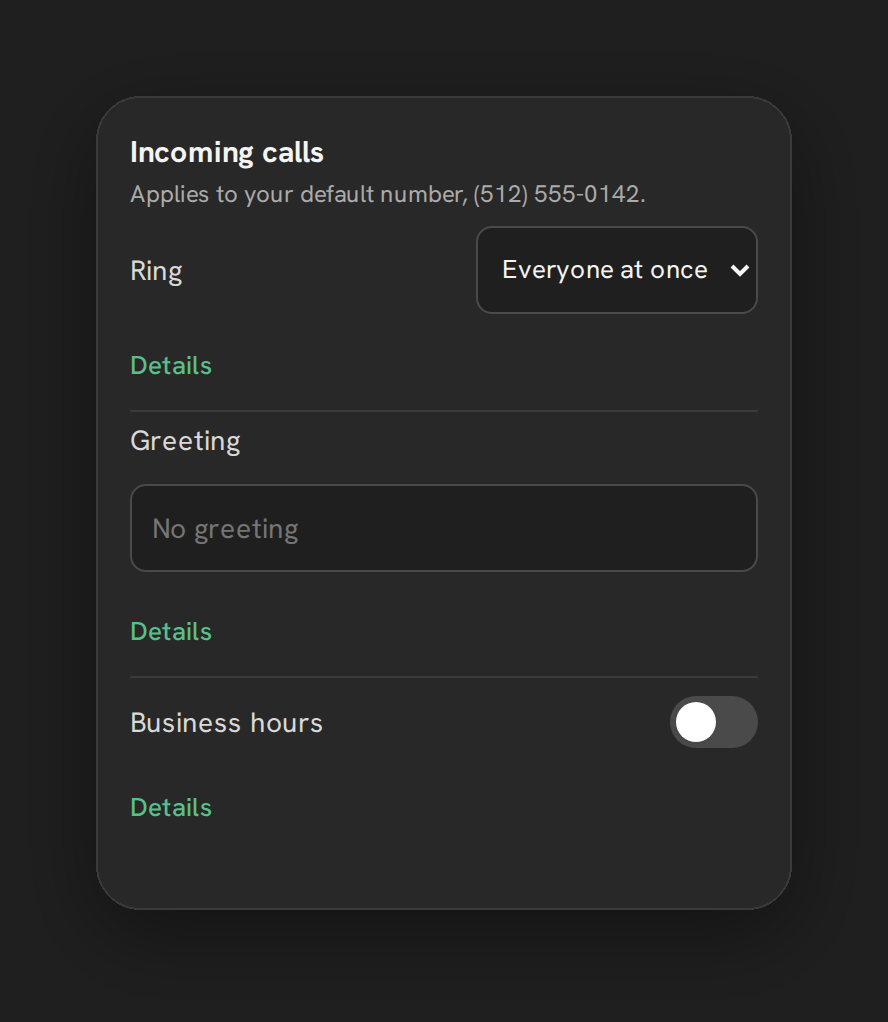
Every setting here applies to a sub-account’s default number, configured from Settings, then Calls, then Incoming calls. A call checks business hours first: a time zone, an open and close time, and day-of-week chips. Inside those hours, the call rings using whichever mode is set. Outside them, the call skips straight to the same fallback chain a missed call gets: forward, then voicemail, then a spoken greeting.
Ring-all: the default
Everyone at once rings every logged-in, ringable rep simultaneously. Whoever answers first gets the call; everyone else’s phone stops ringing.
This is the simpler mode, and it’s the default for a reason: it gives a call the best odds of being answered fast, since it doesn’t wait on any one rep. The tradeoff is that it can feel chaotic on a bigger team, several phones going off for one call, and it gives no particular rep first crack at a lead.
Round robin call routing: one rep at a time
Round-robin rings one ringable rep for 15 seconds, then moves to the next, for up to 4 turns, before falling through to forward or voicemail. The rotation cursor advances by one position per call, so the same rep doesn’t get rung first two calls in a row. Setup steps are in the round robin routing doc.
This suits teams that want calls distributed rather than raced for, or that want a specific rep to get the first shot at a call before it moves on. The tradeoff is slower pickup on a call nobody answers in the first ring or two, since round-robin works through reps in sequence rather than all at once.
| Ring-all | Round-robin | |
|---|---|---|
| Who rings first | Every ringable rep, at once | One rep, then the next, up to 4 turns |
| Best for | Fastest possible pickup | Distributing calls, not racing for them |
| Feels like | Every phone goes off together | One phone at a time, 15 seconds each |
| Default | Yes | No, set it in Settings |
What’s not built: in-order routing
There’s no way to set a custom rep sequence today, ring this rep first, then that one, regardless of rotation. If your team needs a fixed hierarchy (a lead rep, then a backup, then a manager), round robin doesn’t give you that control; it rotates through whoever’s ringable rather than following a set order. This is a real gap, not a hidden setting, and there’s no workaround inside Phone Clover today.
Who counts as “ringable”
Neither mode rings a rep who isn’t actually available. A rep counts as ringable when their presence heartbeat, posted every 30 seconds while their phone is connected, was seen within the last 90 seconds, and they haven’t marked themselves Away. The Away toggle sits in the top bar of both the floating widget and the full Phone page, and it persists across sessions, so stepping away and forgetting to log out doesn’t leave a rep looking ringable when they’re not at their desk.
Business hours and the greeting
Business hours are one time zone, one open and close time, and day-of-week chips, per number; there’s no per-day hours or holiday schedule yet. Outside those hours, a call behaves as if nobody’s available, and runs straight through the same forward, voicemail, greeting chain a missed call inside hours gets. The greeting itself is a typed field, up to 300 characters, spoken with text-to-speech before the call proceeds; there’s no recorded-audio greeting option.
The fallback: forward-to-mobile
If nobody answers, ring-all or round-robin, the call tries a forward number next, if one’s set. Your own number is always kept as the caller ID a caller sees, so a forwarded call never looks like it came from a rep’s personal mobile. See forward calls to mobile for how that’s configured, and round robin routing and ring-all routing for the step-by-step on each mode. If the call still goes unanswered at the end of that chain, an optional missed call text back can send the caller one automatic text.
Which one for your team
- Small teams, or when speed matters most: ring-all. Every ringable rep gets a shot, and the call is answered as fast as anyone can pick up.
- Bigger teams, or when you want calls spread out rather than raced for: round-robin. One rep at a time, rotating, so the same person isn’t always first.
- Teams that need a fixed hierarchy: neither mode gives you that today. In-order routing isn’t built.
Where this leaves you
GoHighLevel call routing on Phone Clover comes down to two honest choices: ring everyone, or ring one rep at a time in rotation. Both check who’s actually online before ringing them, and both fall back to forward, then voicemail, when nobody answers. If you need a custom rep order, that’s not built yet; plan around ring-all or round-robin instead.
See Routing & Presence for the full feature page, and Calling for how routing fits into everything else Phone Clover does on the phone side.