
AI Call Summary in GoHighLevel: Native, DIY or Phone Clover
gohighlevel ai call summary 8 min read
What an AI call summary looks like in GoHighLevel, with an example, and three ways to get one: HighLevel transcription plus a workflow, DIY, or Phone Clover AI Notes.
- Best for
- Agencies and teams deciding how to get a short written summary of each call onto the HighLevel contact, and what each route costs in setup and upkeep.
- Not for
- Anyone who needs speaker labels, a chosen transcription language, or the summary shown inside the phone's own call list. AI Notes does not do those.
- The difference
- AI Notes is a switch in the recording settings, not a workflow you build. The summary and transcript land on the contact as a HighLevel note, with 1,000 bundled minutes per sub-account each UTC month instead of per-minute billing.
An AI call summary is a few lines of text, written by a language model from a call transcript, that tells you what the call was about and what to do next. In HighLevel it is most useful as a note on the contact, so nobody has to replay a recording to know what happened.
Here is the shape of one. This example is made up to show the format. It is not a real call or real customer output.
Example (illustrative):
- Caller asked about moving their office line to a new number before the 15th.
- Agreed to send the number list and the current carrier name.
- Concerned about missed calls during the switch.
Next step: Send the number list and confirm a cutover date.
There are three ways to get that into HighLevel.
- Use HighLevel’s own call transcription and build a workflow that summarizes it.
- Build your own pipeline with a workflow template or a marketplace app.
- Use Phone Clover’s AI Notes, a switch in the recording settings.
They differ in how much you set up, where the summary ends up, and how you pay. This post compares them plainly. We built the third one, so we tell you its limits too.
Option 1: HighLevel’s call transcription plus a workflow
This is the route HighLevel documents itself. We read its guide to transcribing calls and its support article on enabling call transcriptions. Here is what they say.
Turn on transcription. In a sub-account, go to Settings, then Phone System, then the Voice tab. HighLevel’s guide says to toggle on call recording and call transcription. The support article adds that transcription requires call recording to be enabled on the phone numbers, and that it only applies to calls recorded after you switch it on. Older recordings are not transcribed.
Where the transcript goes. HighLevel saves transcripts as searchable text on the contact record. The support article says you can also open them from the Conversations tab, on the call entry, with “View Transcript” under the playback controls.
Get a summary. The transcript alone is not a summary. HighLevel’s guide builds the summary with a workflow:
- Create a new workflow from scratch.
- Pick “transcript generated” as the trigger.
- Add the “AI summarize text” workflow action and give it the transcript as its input.
- Send the result somewhere useful, such as an internal notification.
What you own. You build and maintain that workflow, one sub-account at a time unless you copy it across. You decide what the summarize prompt asks for, and where the output goes. If you want the summary written to the contact as a note instead of a notification, you add that step yourself.
Cost. HighLevel’s support article describes transcription as a per-recorded-minute charge billed in addition to your standard call-recording fee. We are not quoting a rate here, because we saw different figures on different pages. Check HighLevel’s current pricing page. The guide also does not say which carriers this works with, so confirm that for your setup before you rely on it.
Who it suits. Teams already deep in HighLevel workflows who want full control over the prompt and the routing, and who are happy to maintain it.
Option 2: Build it yourself with a workflow template or marketplace app
The second route skips HighLevel’s built-in transcription. You grab a workflow template or install a marketplace app. It takes the recording, sends it to a speech-to-text service, sends the text to a language model, and posts the result back to HighLevel.
This can work well, and it is flexible. You can shape the output exactly how you like. It is worth being clear about what you take on.
- You maintain the chain. A recording webhook, a transcription service, a language model and a write-back are four things that can each break or change. When one does, calls quietly stop getting summaries until someone notices.
- Cost can hide in several places. You may pay for the speech-to-text service, the language model, the automation platform that runs the steps, and any app subscription. Each bills differently, and the total depends on call volume. Add them up before you compare.
- Credentials and data flow. Call audio and transcripts pass through more vendors. You need to be comfortable with that, and with keeping the keys current.
- Edge cases are yours. Very short calls, silent recordings, huge files and retries after a failure all need handling. If you do not handle them, you pay to process junk or process a call twice.
Who it suits. Teams with someone technical who enjoys the plumbing, or with unusual needs that a packaged feature will not meet, such as a custom summary format or routing into other systems.
Option 3: Phone Clover AI Notes
Phone Clover is a private HighLevel app, in early access, that runs HighLevel calling and texting on your own Telnyx account. Calling runs in the pilot account today. AI Notes is the summary feature inside it.
Turn it on. Go to Settings, then Calls, then Recording, and enable “Transcribe and summarize”. Also enable recording for the incoming or outgoing calls you want processed. Recording itself is free and built in. An admin on a plan that includes AI notes can switch it on directly. The card shows used and remaining AI minutes and the reset date.
What happens after a call. A background job picks up recorded calls and transcribes them with Whisper. A language model then writes a summary of 2 to 5 bullets plus a “Next step:” line. Allow a few minutes after the call ends. The job writes a transcript excerpt, capped at 4,000 characters, and the summary onto the contact as a HighLevel note. It runs on Cloudflare Workers AI, not on Telnyx. Telnyx only delivers the recording.
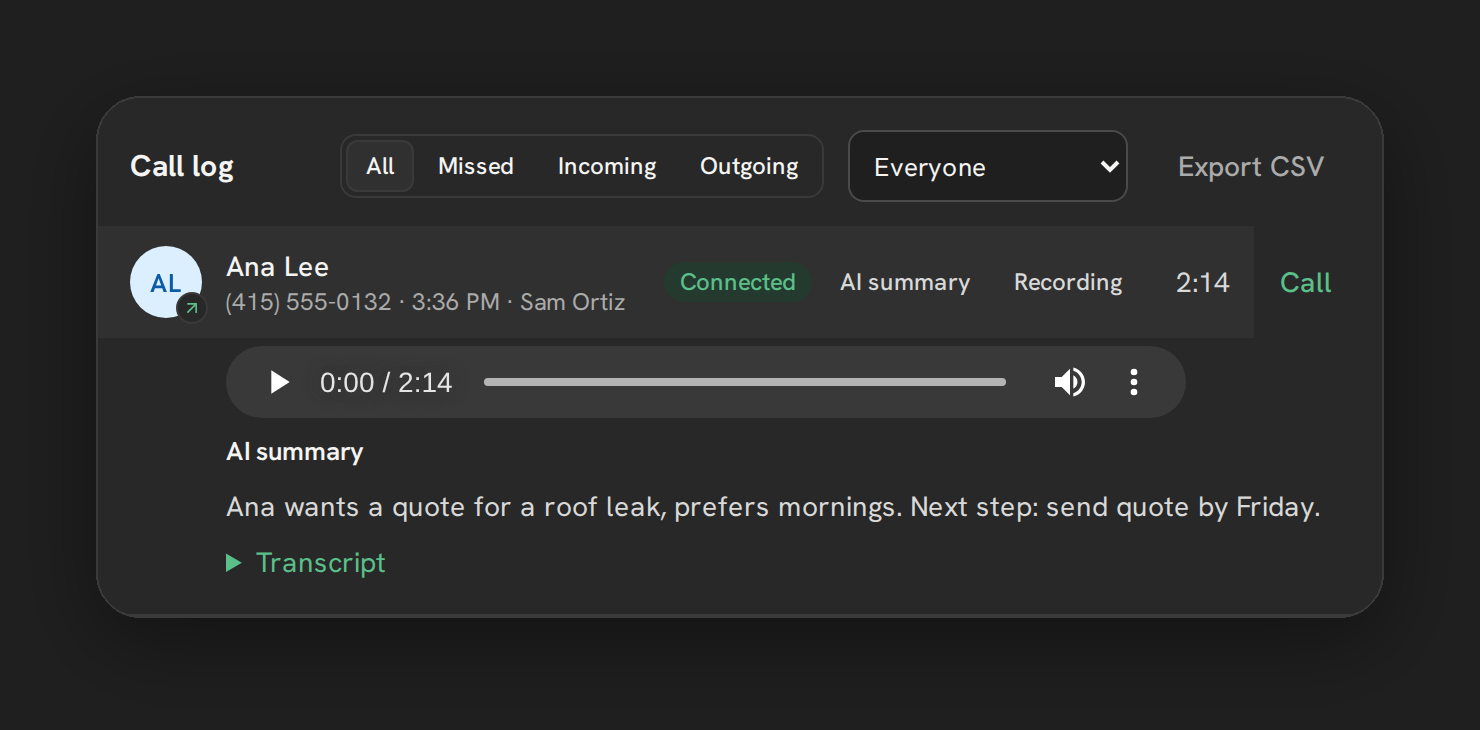
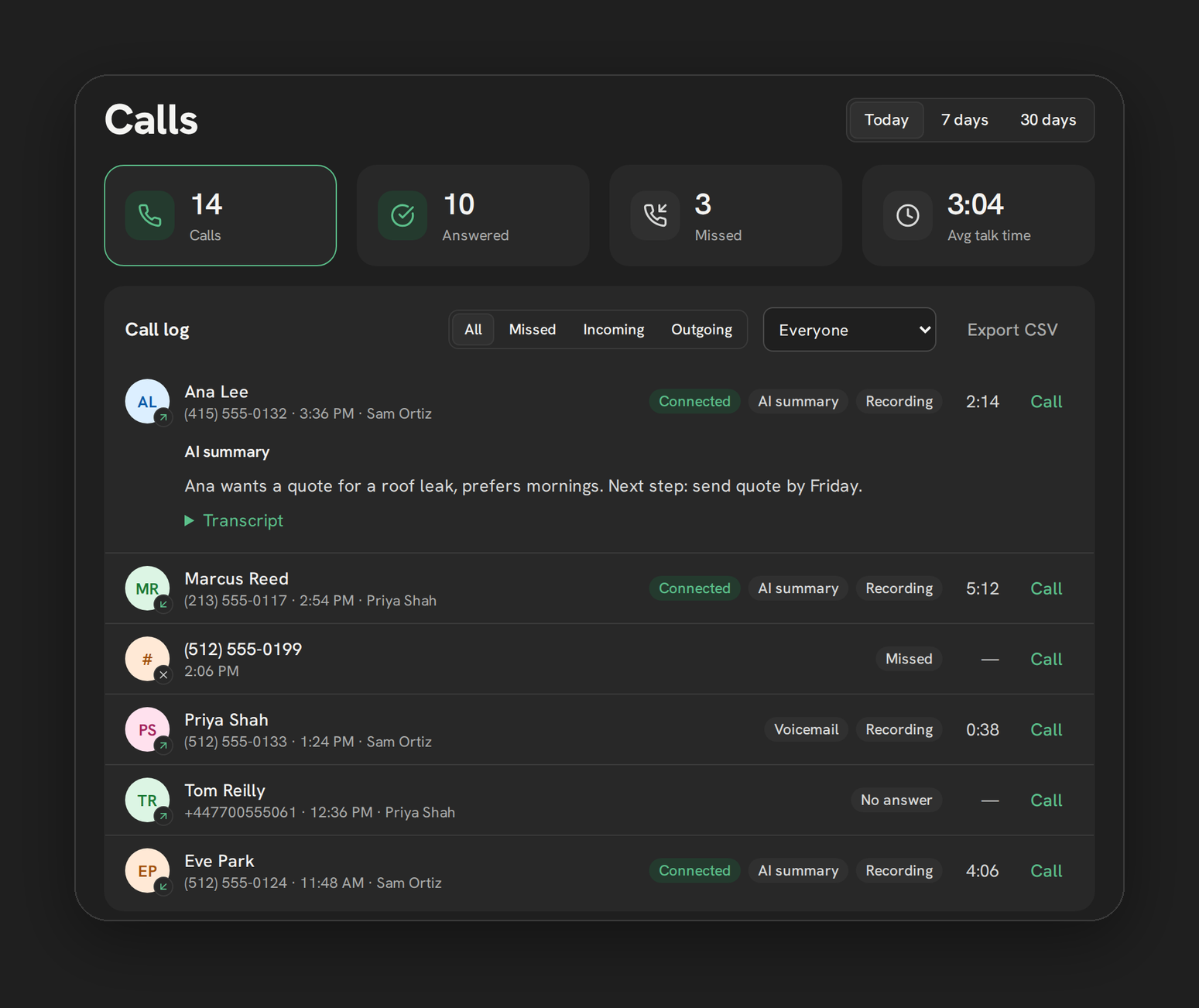
Where you see it. On the contact, as a note. In the dashboard call log, a call row expands to the recording player, an “AI summary” heading with the text, and a collapsible transcript. See Recordings and AI Notes and AI transcripts and summaries for the walkthrough.
What it costs. AI Notes is included in Pro, Growth 5, Growth 10 and Scale. Texting and Base do not include it. Each covered sub-account gets 1,000 recorded-call minutes per UTC month, with no pooling between sub-accounts, no rollover and no automatic overage charge. It is bundled, not metered, so there is no per-minute charge. A whole call must fit in the remaining allowance. If it does not, that call waits, and calling and recording carry on as normal. The allowance can change with notice, and prices are early-access prices. See pricing for the plans.
What it skips. Calls under 10 seconds, silent recordings and files over 20 MB. None of these count against the allowance. Temporary failures retry automatically, up to three processing attempts, and sending the result to HighLevel Notes retries separately, up to five attempts. A successful call is counted once.
What it does not do.
- No speaker labels.
- No language choice beyond auto-detect.
- No summary inside the phone’s own call list. It shows up as a contact note and in the dashboard row.
Note: Phone Clover itself is not self-serve yet. It is a private early-access app set up by arrangement, and voice calling is early access. Once your sub-account is on a plan that includes AI Notes, an admin switches it on.
The three options side by side
| HighLevel transcription + workflow | DIY template or marketplace app | Phone Clover AI Notes | |
|---|---|---|---|
| Setup effort | Toggle transcription, then build a workflow | Install or import, connect several services | One switch in Settings, Calls, Recording |
| Where the summary lands | Wherever your workflow sends it, such as a notification | Wherever you configure the write-back | Contact note and dashboard call log |
| Cost model | Per recorded minute on top of recording fees; check current pricing | Depends on each service in the chain; check current pricing | 1,000 bundled minutes per sub-account each UTC month in Pro and agency bundles, no per-minute charge |
| Upkeep | You maintain the workflow | You maintain the whole chain | We maintain the processing |
| Limits | Applies only to calls recorded after you enable it | Whatever you build or install | No speaker labels, auto-detect language only, not shown in the phone’s call list |
What a good call summary note should contain
Whichever route you pick, judge the output by whether someone can act on it in ten seconds. A useful note has:
- Why they called, in one line.
- What was agreed or decided.
- Any date, number or name someone will need again.
- One clear next step, with who owns it if you can tell.
- A link back to the recording, so a doubt can be settled by listening.
If you build your own prompt in Option 1 or 2, ask for exactly these. AI Notes writes a few bullets and a “Next step:” line, so it covers the first, second and fourth by default. Treat any summary as a pointer, not a record. When the details matter, play the recording. See call recording and tracking for how recordings and the call log fit together.
Who should use which
- Pick Option 1 if you live in HighLevel workflows, want control over the prompt, and do not mind building and maintaining the workflow. Check the transcription rate first.
- Pick Option 2 if you have a technical owner and a need a packaged feature will not meet. Budget for upkeep, not just setup.
- Pick Option 3 if you want summaries on the contact with the least work, you already run or plan to run calling through Phone Clover, and the limits above are fine for you.
These are not exclusive. Some teams start with the simplest route and only build their own pipeline when they hit a real gap.
Where to go next
- Recordings and AI Notes: the feature page.
- AI transcripts and summaries and the AI Notes overview: how it works in detail.
- Recording settings: where the switch lives.
- Dashboard and reporting: the call log where the summary appears.
- Pricing and HighLevel calling on your own Telnyx account.