
GoHighLevel SHAKEN/STIR and Friendly Name (CNAM): What Each One Does
gohighlevel shaken/stir friendly name 6 min read
SHAKEN/STIR proves a call is genuine. A caller ID name (CNAM) shows who is calling. Here is what each does in GoHighLevel, and where to check every number.
- Best for
- HighLevel admins who keep seeing SHAKEN/STIR, CNAM and 'friendly name' in settings and docs and want to know which one does what.
- Not for
- Anyone hoping that either setting removes Spam Likely labels. Neither does, and no tool can promise that.
- The difference
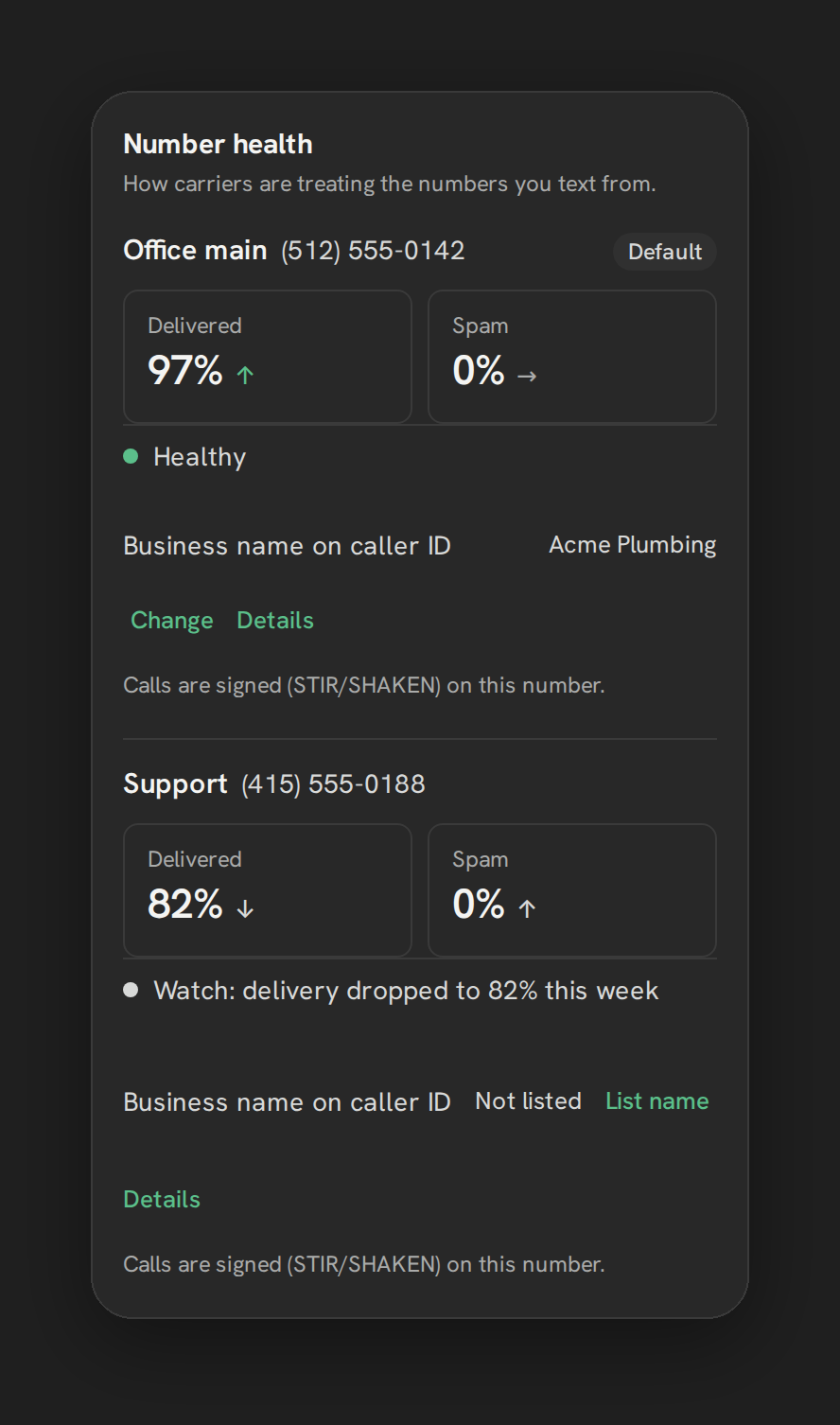
- Phone Clover reads each number's caller ID name and a STIR/SHAKEN signing note onto one Number health card on your own Telnyx account. It reads them. It does not register or change them.
Two things get mixed up on almost every HighLevel phone setup. One is the name that may appear on a customer’s screen. The other is proof that the call really comes from the number it claims. They are different features, set up in different ways, and they do different jobs.
This post separates them. It covers what SHAKEN/STIR does, what a caller ID name (CNAM) does, and what to make of the phrase “friendly name”, which shows up in searches far more than in documentation. It also covers where a rep or admin can see the status of each number.
What SHAKEN/STIR does
STIR/SHAKEN is a set of protocols built to fight caller ID spoofing, where someone fakes the number on a call. The idea is that the carrier that starts the call vouches for it, and the carrier that receives it can check that vouching. In other words, it authenticates the originating carrier’s claim about the number. It does not tell the person called who you are as a business.
HighLevel describes SHAKEN/STIR as a caller authentication framework that helps carriers verify that a caller is authorized to use the phone number shown on an outbound call. A few details from its help center:
- It needs an EIN. A valid Employer Identification Number is required for HighLevel’s SHAKEN/STIR registration. Businesses without one do not qualify for the documented registration.
- Enrollment can be automatic. Eligible numbers may be enrolled through a qualifying A2P SMS registration submitted after April 23, 2025, and HighLevel says older sub-accounts are being updated automatically too. If you have done A2P, check before you register again. See A2P 10DLC registration.
- It comes before Voice Integrity. SHAKEN/STIR must be in place before you submit a Voice Integrity application, HighLevel’s tool that submits US numbers to First Orion, Hiya and TNS for reputation review. HighLevel lists CNAM as optional but recommended for that application.
- It has a stated limit. HighLevel says it does not guarantee a call shows as “Trusted” or “Verified”, and it does not directly remove “Spam Likely” or other nuisance labels.
What a friendly name / caller ID name (CNAM) does
CNAM is the caller ID name service, described on Wikipedia as Calling Name Presentation. In the US the name is not sent along with the call. The receiving side looks the name up using the calling number. That is why a name you registered can appear on one phone and not another.
HighLevel’s CNAM page says it associates your number with a registered business or personal name, and recipients’ carriers may show that name instead of only the number. Registration asks for a 9-digit EIN, your legal business name, a registered business address (no P.O. boxes), and an authorized contact. HighLevel is blunt about limits: name display is not guaranteed, because carrier policies, devices and caller ID services decide what is shown. It also says CNAM does not remove Spam Likely labels and does not replace SHAKEN/STIR.
The honest note on the wording
Here is what we could confirm. HighLevel’s SHAKEN/STIR, CNAM and Voice Integrity help articles do not use the phrase “friendly name”. HighLevel does use “Friendly Name” in one place we found: a field in the Basic Details tab of a phone number’s settings, described only as a way to rename the number. That page does not say the name is shown to the people you call, and it does not connect the field to CNAM.
So when someone searches for a “SHAKEN/STIR friendly name”, they most likely mean one of two things:
- The caller ID name (CNAM), the business name a customer might see. This is the usual meaning.
- The internal label on a number in the phone settings, which is for your team.
If you want customers to see your business name, that is CNAM. Renaming the number inside HighLevel is not the same thing, as far as HighLevel’s documentation says.
Side by side
| SHAKEN/STIR | Caller ID name (CNAM) | |
|---|---|---|
| What the person called may see | Nothing on its own. It works between carriers. | A registered name instead of only a number, if their carrier displays it |
| What it proves | The caller is authorized to use the number shown | Nothing. It is a label looked up from the number |
| How it is set up in HighLevel | Registration with an EIN, or automatic enrollment through qualifying A2P registration | Separate registration with business details and an EIN |
| What it cannot fix | Does not directly remove Spam Likely labels | Not guaranteed to display. Does not remove Spam Likely labels |
Note: Neither one replaces A2P registration for texting. HighLevel’s CNAM page says CNAM does not replace SHAKEN/STIR, A2P registration or Voice Integrity.
Why neither guarantees you won’t be labelled Spam Likely
A signed call and a clean name both tell the carrier something good. Neither decides how the receiving phone labels you. That decision happens on the recipient’s side, from reputation signals such as calling patterns and complaints, and it can change after you fix things. HighLevel’s Voice Integrity guide says as much: each provider and carrier evaluates reputation independently, and a number can be flagged again.
So treat SHAKEN/STIR and CNAM as groundwork, not a fix. Doing them does not buy a clean label. For the causes and what moves the needle, read why GoHighLevel calls show up as Spam Likely. For the texting side, see how to improve SMS deliverability in GoHighLevel.
Seeing the status per number in Phone Clover
Phone Clover is a private HighLevel app, in early access, that runs calling and texting on your own Telnyx account. Your numbers are Telnyx numbers on that account. The question “is this number set up right?” is hard to answer from memory when you have several, so the Number health card puts it in one place.
Open Settings, then Texting, then Number health. This card is for admins. For each number it shows:
- Delivered and Spam tiles, with a trend.
- An overall status line.
- The CNAM, the caller ID name on the number, so you can spot a missing or wrong one.
- A STIR/SHAKEN signing note, a general statement that calls are signed, not a live status for that number.
When a number looks unhealthy, an amber Check number health badge appears in the top bar. It is checked every 5 minutes and admins can click through to the card. If you have two or more enabled numbers, an optional switch can move texting off a flagged number.
Phone Clover reads these values. It does not register, buy, set or change your CNAM or your signing. Those stay a matter between you, your registrations and your carrier. See the number health page and Number health radar for the full card.
One limit to keep in mind. The CNAM and reputation work only affects US-to-US calls to T-Mobile and Verizon mobile numbers. It does not remove Spam Likely labels across every carrier and call type, and we would not trust anyone who says it does.
A short checklist
- Decide what you want. A name customers can see is CNAM. Proof the number is yours is SHAKEN/STIR. A renamed number in settings is only a label for your team.
- Check what is already done. If you registered for A2P after April 23, 2025, your numbers may already be enrolled in SHAKEN/STIR.
- Have your EIN and business details ready. Both registrations ask for them.
- Look at each number, not just the account. Open the Number health card and read the CNAM and STIR/SHAKEN lines per number.
- Do not expect a label to disappear. Watch your calling pattern and your delivery tiles instead.
- Keep a second number ready if you can, so one flagged number is not your only line.
Where to go next
Setting up numbers on your own carrier account? Read Telnyx for GoHighLevel, Calling and number management. For registration on the texting side, see A2P 10DLC for HighLevel agencies.