

How to Improve SMS Deliverability in GoHighLevel
GoHighLevel SMS deliverability 7 min read
Practical steps for GoHighLevel SMS deliverability: 10DLC basics, spam ratio and number health, firewall rules, and reading failed-delivery reasons.
- Best for
- Teams sending real SMS volume through Telnyx-backed numbers who want the actual reason a message failed instead of a generic error.
- Not for
- Very low-volume senders, or anyone expecting a tool that removes spam labels across every carrier and call type.
- The difference
- A number health radar with auto-rotate that moves texting to a healthier number once one is flagged, most useful with at least two enabled numbers.
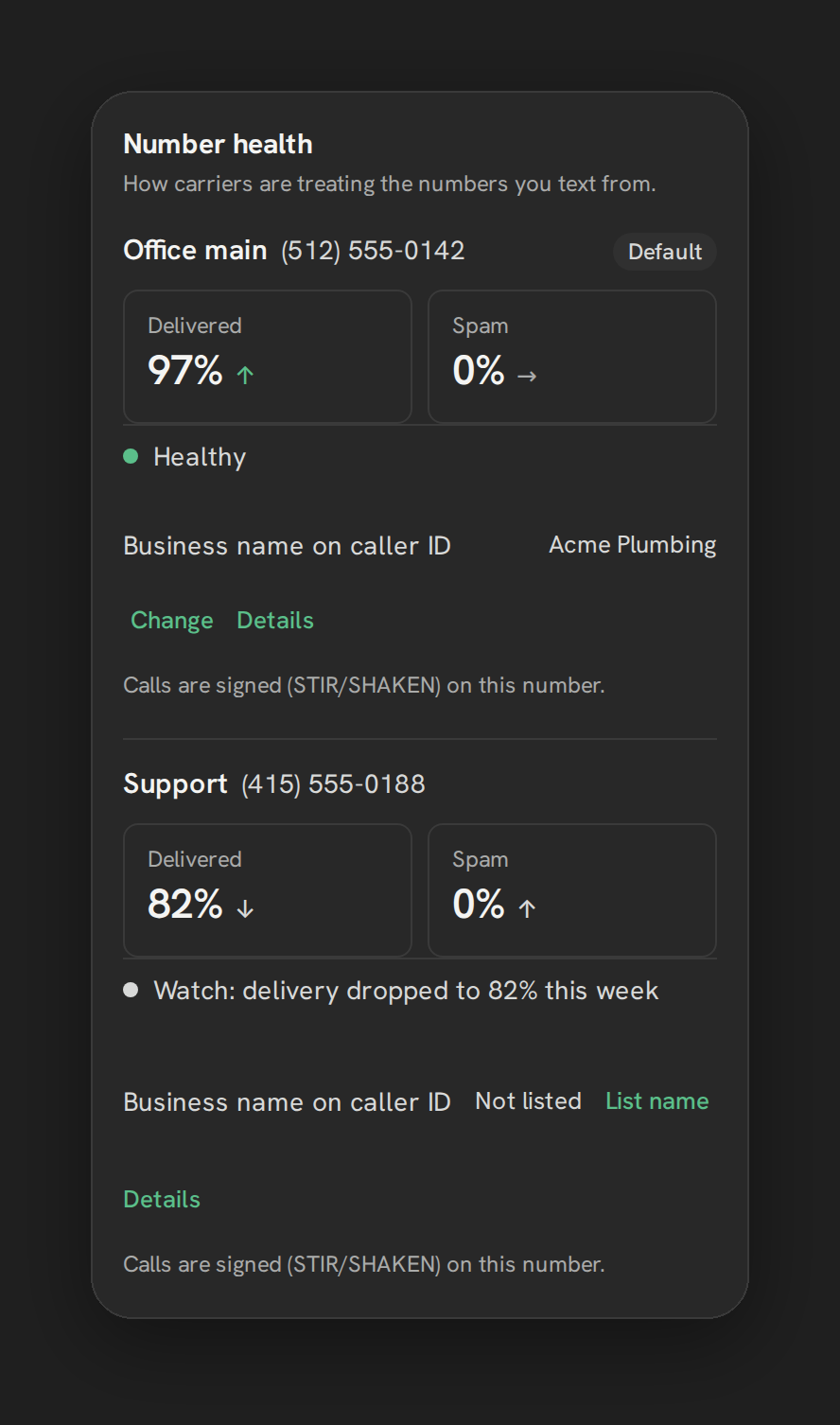
A text that never arrives is worse than a call that goes to voicemail, because there’s usually no signal that anything went wrong. If GoHighLevel SMS deliverability has been inconsistent for your account, the fix usually isn’t one setting. It’s a combination of carrier registration, watching number health before it becomes a problem, and being able to read the actual reason a message failed instead of guessing.
Why messages fail
US carriers filter business SMS aggressively, and they don’t explain themselves in plain language. A generic failure could mean the number isn’t registered for business texting, the recipient’s carrier flagged the content, the number hit a sending limit, the recipient opted out at some point, or you’re texting a landline that can’t receive SMS at all. Without visibility into which of these happened, every failure looks the same: a message that just didn’t go through.
Phone Clover’s Settings → Texting → “Failed texts” card translates the raw carrier error into one of nine plain categories: Blocked by a carrier, Number not registered for texting, Landlines, Opted out, Message content, Sending limits, Wrong number or setup, Temporary problems, or Unknown. Two controls sit alongside it: “Retry from another number” (automatically resends from another owned number) and “Skip landlines” (checks a number before texting it, so you don’t burn a send attempt on a number that can never receive SMS). See Why texts fail and what the reasons mean for the full breakdown.
10DLC basics
A2P 10DLC (Application-to-Person, 10-Digit Long Code) is the carrier-mandated registration process for business texting in the US. Unregistered numbers get filtered or blocked far more often, and carrier error 30007 (“filtered by Lead Connector or the carrier”) is one of the most common complaints across GHL’s own user community.
Phone Clover’s registration wizard walks through it as a strip UI: Business (identity fields, including a 9-digit EIN, of which only the last four digits are retained after registration), Use case (what and why you’re texting customers, 2 to 5 example messages, opt-in method, and HELP-reply handling), Review (a status timeline with a “Fix and resubmit” button on failure and a “Check now” link), and Toll-free (a separate verification form, if the account has a toll-free number).
Note: One brand and one campaign per sub-account is a schema-level limit. Numbers added after a campaign is already approved aren’t auto-assigned to it; you need to use “Check now” to pick them up.
Warning: Neither we nor GHL control TCR or the carriers. There’s no way to promise faster approval, and treat any vendor claiming otherwise with skepticism.
See Register for A2P 10DLC for the step-by-step walkthrough.
Spam ratio and number health
Registration gets you approved to text. Number health is what keeps a registered number performing well over time. Carriers track how recipients respond to a number, and if too many people report a message as spam, or too many messages simply fail to deliver, the number’s reputation drops, which makes future messages more likely to be filtered.
Phone Clover’s number health radar, in Settings → Texting → “Number health,” shows a per-number Delivered/Spam trend, an overall status line, the CNAM (caller-ID name) currently showing, and whether STIR/SHAKEN signing is active. A number is marked unhealthy once its spam ratio exceeds 1% or its success ratio drops below 85%, measured after at least 20 messages sent, and it becomes eligible to be marked healthy again after 72 hours clear of those thresholds.
If you have two or more enabled numbers, a bottom switch, “Pause a number that gets flagged,” moves texting automatically to the healthiest available number until the flagged one recovers. An amber top-bar badge, “Check number health,” appears whenever at least one number is unhealthy, checked every five minutes.
Note: This doesn’t remove “Spam Likely” labels broadly. It only affects how carriers treat US-to-US calls to T-Mobile and Verizon mobile numbers. Frame any internal expectations around that scope, not a blanket fix.
See See per-number delivery and spam trends and the feature page at /product/number-health.
Block/allow firewall rules
Deliverability isn’t only about outbound sends. The SMS firewall filters inbound texts before they reach your Conversations inbox, which matters for keeping your own reps’ attention on real messages and for keeping your number’s reputation clean from spam replies.
Rules apply in this order: an allow list beats a block list; then a country allowlist (empty means accept from anywhere, otherwise two-letter codes like US, CA, GB); then a block on virtual-number (VoIP) senders; then a content-score rule (a score of 70 or higher quarantines the message); then a velocity/rate rule. Quarantined messages are held in a “Blocked in the last 7 days” list, each showing the sender, timestamp, and reason, with Release or Always block actions available.
Note: Quarantined message bodies are stored up to 500 characters, and the underlying number-type lookup used for the VoIP block is cached for 30 days.
See Set block and allow rules for texting for the full configuration.
Reading failed delivery reasons
Once registration, number health, and the firewall are all in place, the failed-texts card becomes your ongoing diagnostic tool rather than a one-time setup step. Check it after any noticeable drop in reply rates, not just after a customer complains a text never arrived. A cluster of “Number not registered for texting” failures usually means a new number wasn’t picked up by your existing 10DLC campaign; a cluster of “Landlines” failures means your list needs cleaning before it’s dialed or texted again.
Building a deliverability routine
Deliverability isn’t a set-and-forget checklist item. A reasonable weekly routine looks like this: check the “Check number health” badge if it’s showing amber, skim the failed-texts card for any new category clusters, and glance at the quarantine list to release anything the firewall caught that shouldn’t have been blocked. If you’re running multiple numbers and have auto-rotate turned on, confirm it actually moved traffic the way you’d expect after a flag, rather than assuming the switch is working silently in the background.
New numbers deserve extra attention in their first two weeks. A freshly registered number with no sending history is more sensitive to spam-ratio swings than an established one, simply because the 20-message threshold that determines whether the ratio counts is reached faster on a slower-sending number. Watch a new number’s health card daily for the first stretch rather than assuming it behaves like your established ones from day one.
What good deliverability actually looks like
There’s no single dashboard number that proves everything is fine. A healthy setup looks like: a registered 10DLC campaign covering every number that sends business texts, a spam ratio comfortably under 1% on each enabled number, a failed-texts card with mostly “Temporary problems” or “Opted out” entries rather than “Number not registered” or “Blocked by a carrier,” and a quarantine list you check occasionally rather than one that’s constantly full. None of these are guarantees, since carrier behavior can shift without notice, but together they’re a reasonable signal that the setup is doing its job.
How this connects to the rest of your setup
Deliverability doesn’t sit in isolation from the rest of your phone and texting setup. A number that’s failing 10DLC checks is also more likely to look unhealthy on the number health radar, since unregistered sends often get filtered outright, which drags down the success ratio the health thresholds are measuring. If you’re seeing both problems at once, fix registration first; a lot of apparent “health” issues clear up once a number is properly registered and carriers stop filtering its traffic by default.
Similarly, if you’re just getting started and haven’t decided which number to register at all, work backward from your actual business number before troubleshooting deliverability on a throwaway test number. See How to use Telnyx numbers in GoHighLevel for the general setup path, and come back to this checklist once real traffic is flowing. None of these steps are optional shortcuts around each other; registration, health monitoring, and the firewall each catch a different failure mode, and skipping one usually just moves the problem to wherever you’re not looking.
When Phone Clover fits, and when it doesn’t
Phone Clover’s deliverability tools fit teams sending real volume through Telnyx-backed numbers who want visibility into why a message failed instead of a generic error, and who are willing to do the 10DLC registration work up front rather than skip it. The number health radar and auto-rotate are most useful once you have at least two enabled numbers to rotate between.
It’s a weaker fit if you’re sending very low volume where none of this friction shows up yet, or if you’re expecting a tool that removes spam labels across every carrier and call type. No vendor, including us, can promise that. Start with registration if you haven’t done it yet: see How to text-enable an existing business number without porting if you’re still deciding which number to register in the first place.