

How to Text-Enable an Existing Business Number Without Porting
use existing number for SMS GHL 7 min read
Use an existing number for SMS in GHL without porting it. How hosted SMS works, what changes, what doesn't, and a setup checklist.
- Best for
- A US landline or VoIP business number where you do not want to touch how calls reach you, and can submit a letter of authorization plus a phone bill.
- Not for
- Mobile numbers, which always fail the hosting check, or anyone who needs texting live the same day.
- The difference
- Adds SMS to a number you already use for calls, without porting it; Telnyx review typically takes 1 to 3 business days.
Your business number is already printed on trucks, invoices, and your Google Business Profile. Porting it to a new provider just to add texting is a real hassle, and it risks a call outage if anything goes wrong mid-port. If you want to use an existing number for SMS in GHL without porting, that’s exactly what Phone Clover’s Hosted SMS wizard is built for.
This guide covers how hosted SMS works, what changes on your number and what doesn’t, and a checklist so the request doesn’t get rejected on the first try.
Why businesses want to keep their number
Porting a phone number means changing who technically owns and routes it. Even when a port goes smoothly, there’s a window where things can go wrong: missed calls, a number that briefly doesn’t ring anywhere, a delay while the new carrier catches up. For a business number that customers call directly, that risk is rarely worth it just to add texting.
Hosted SMS sidesteps the whole problem. Instead of moving the number, you ask Telnyx to take over only the texting side of it. Voice keeps routing through whatever provider handles your calls today, untouched, for the entire process and afterward.
Hosted SMS explained
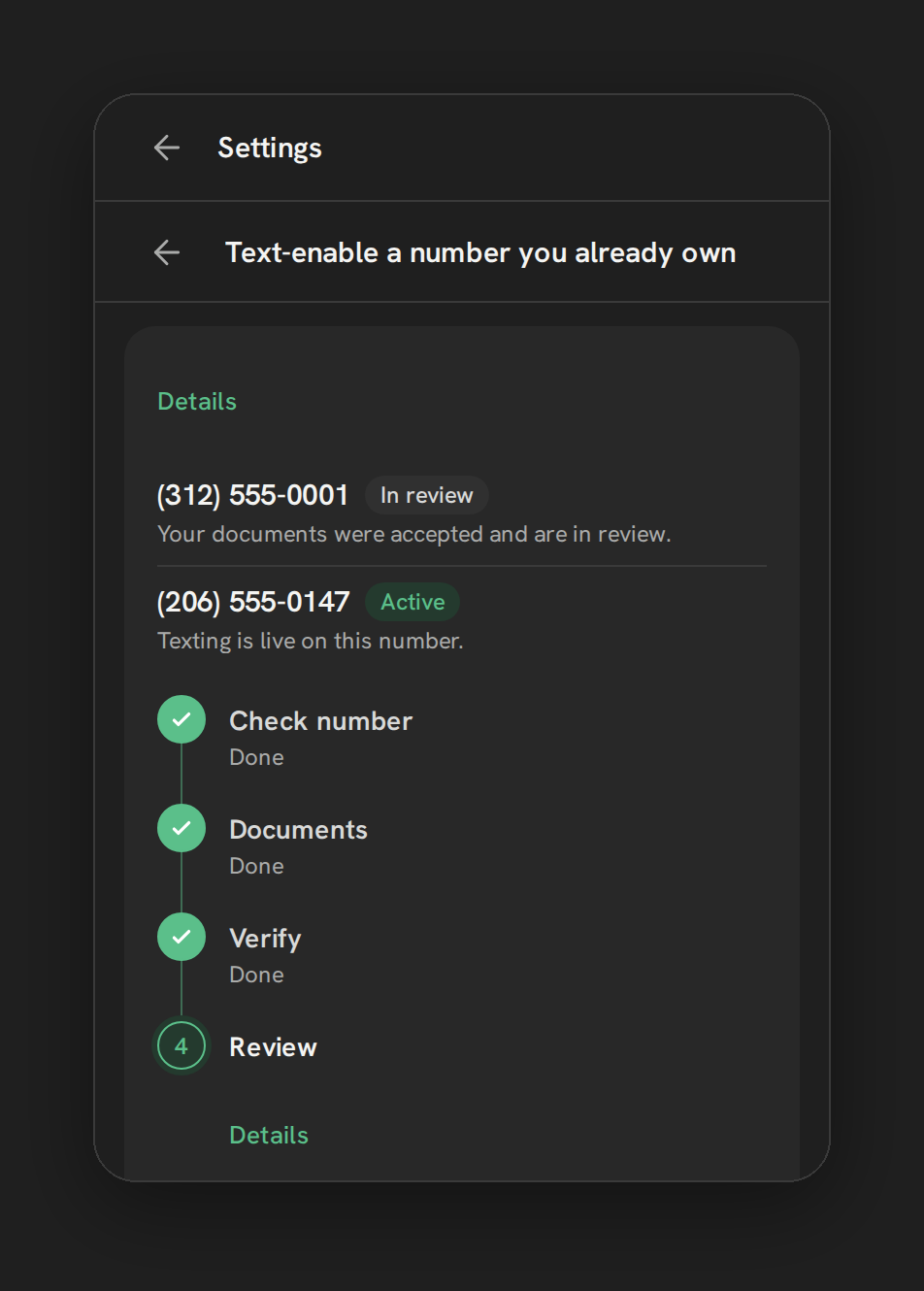
Hosted SMS is a real product Telnyx offers, and Phone Clover wraps it in a guided wizard so you don’t have to deal with raw carrier forms. From Settings → Numbers → “Add a number,” choose “Text-enable a number you already own.”
The wizard is four steps, shown as a vertical rail:
- Check number. Enter the number and click “Check this number.” Landline and VoIP (internet phone) numbers qualify. Mobile numbers don’t, and the check stops there if you try one.
- Documents. Upload two PDFs, each up to 5 MB: a signed letter of authorization (a template is available in the wizard) and a recent phone bill that shows the number.
- Verify. Phone Clover texts a short code to the number to confirm you actually control it. Enter the code to move on.
- Review. Telnyx reviews the request Monday through Friday, usually within 1 to 3 business days. Texting switches on automatically the moment it clears. There’s nothing to come back and press.
While it’s in progress, the wizard shows exactly where the request stands: Checking, Awaiting documents, Confirming ownership, In review, Active, or Failed (with the rejection reason shown next to it).
Note: Verification only happens by text message to the number. There’s no voice-call verification option today.
What changes and what doesn’t
What changes: the number can now send and receive SMS through HighLevel, once it’s registered as (or added under) your Telnyx SMS provider setup. Messages sent from Conversations, from a workflow’s Send SMS step, or from bulk SMS can go out from it, and replies land back in the same conversation.
What doesn’t change: calls. Voice on that number keeps routing through your current provider before, during, and after the hosted SMS process. Nothing about how the phone rings is touched. You keep paying your existing voice provider for calls on that number, because they still own that side of it.
Warning: Hosted SMS does not include the ability to cancel or withdraw a request once it’s submitted. If you need to back out, you’ll need to contact support.
Setup checklist
Before you start the wizard, have these ready:
- The exact number, formatted the way it appears on your phone bill.
- A signed letter of authorization. Use the wizard’s downloadable template. It lists five required fields; miss one and the request gets rejected.
- A recent phone bill (PDF, under 5 MB) that clearly shows the number.
- Access to receive a text at that number, since ownership verification is SMS-only.
- A plan for A2P 10DLC registration. Hosted SMS makes the number technically capable of texting. US business texting still requires separate carrier registration, whether the number is hosted or brand new. See Register for A2P 10DLC.
Common mistakes to avoid
Trying to host a mobile number. The check will fail immediately. If your business line is a mobile number, you need a different Telnyx number for texting instead. See Set up your first number.
A letter of authorization missing a required field. The wizard’s collapsible section lists all five fields the letter must contain. Check each one before uploading, since a rejected letter means resubmitting and waiting on review again.
Assuming texting works the moment the request is submitted. Nothing sends until the status reaches Active. Budget the 1 to 3 business days into your timeline if this is tied to a launch date.
Skipping 10DLC registration afterward. Hosted SMS and 10DLC are two different approvals. A number can be hosted and still fail to send texts if it isn’t registered with a carrier campaign. See Register for A2P 10DLC and, once messages start flowing, keep an eye on Why texts fail and what the reasons mean.
How this compares to buying a new number
It’s worth being honest about the trade-off. A new Telnyx number is available immediately, with no letter of authorization, no phone bill upload, and no multi-day carrier review. The cost is that it’s a new number your customers don’t already recognize, and you’d need to update your website, signage, and any printed material if you wanted it to become the primary line.
Hosted SMS costs you time (the review window) and a bit of paperwork, in exchange for keeping the number your customers already dial and already have saved in their phones. For most established businesses, that trade is worth it. For a brand-new business location or a temporary campaign number, a fresh number without the hosting step is usually the simpler choice. See Set up your first number if a new number fits your situation better.
What reps notice, day to day
Once hosted SMS goes active, nothing changes about how a rep works inside Conversations. They text from the same thread they always have. The only visible difference is that replies and outbound messages on that number now route through Telnyx rather than whatever provider handled it before, which matters for admins tracking deliverability but is invisible to the rep sending the message. If you’ve also registered the number as part of your native SMS provider setup, workflow Send SMS steps and bulk sends can use it the same way as any other enabled number. See Send SMS from Conversations for what that looks like from a rep’s seat.
Who should actually run this wizard
Hosted SMS is an admin task, not something a rep should start on their own. Whoever runs it needs access to the business’s phone bill and the ability to get a signed letter of authorization from someone with authority over the account, which is often the business owner rather than the person managing HighLevel day to day. Line up that signature before opening the wizard, since the Documents step won’t let you move forward without it, and a stalled request at that step is a common reason a hosted SMS request sits unfinished longer than the actual carrier review takes.
If the request gets rejected
Rejections happen, and the wizard shows the reason next to the “Failed” status rather than leaving you guessing. Most rejections trace back to one of two documents: a letter of authorization missing one of the five required fields, or a phone bill that’s too old, unclear, or doesn’t show the number in a readable format. Fix the specific document the rejection points to, keep the other one as-is if it wasn’t flagged, and start a new request. There’s no penalty for a second attempt, but budget the full review window again once you resubmit, since a corrected request goes back through the same 1 to 3 business day process. Save a copy of both documents locally before submitting, so a resubmission doesn’t mean tracking down the phone bill or letter template a second time.
When Phone Clover is a fit, and when it isn’t
Hosted SMS through Phone Clover is a strong fit if your business number is a US landline or VoIP number, you don’t want to touch how calls reach you, and you’re comfortable submitting a letter of authorization and a phone bill for a carrier-run review. It’s also worth pairing with Buy Telnyx numbers in GoHighLevel if you’re building out a broader Telnyx setup at the same time.
It’s not the right tool if your business number is a mobile number (host it and it’ll fail the check every time), if you need texting live same-day (carrier review takes real business days, not minutes), or if you want a cancel path mid-request. In those cases, a new Telnyx number with no hosting step, or accepting the review timeline as a fixed cost, is the more realistic plan.
See Text-enable your existing number for the full feature page, including limits on document size and eligible number types.