
A2P 10DLC for HighLevel Agencies (What It Is and How to Register)
A2P 10DLC HighLevel 7 min read
A2P 10DLC HighLevel registration explained for agencies - what carriers require, why it gets stuck, and how a guided wizard inside Phone Clover walks you through it.
- Best for
- Agencies running texting across multiple HighLevel sub-accounts that want one guided flow for A2P 10DLC registration and ongoing number health.
- Not for
- Anyone who needs same-day carrier approval, or a single sub-account with light texting volume where Telnyx's own forms may be just as fast.
- The difference
- A guided wizard and post-registration monitoring inside HighLevel, instead of raw Telnyx or TCR forms handled per client.
If you run texting for more than one HighLevel sub-account, you have probably run into A2P 10DLC already, usually the hard way: a client’s texts stop delivering, and the root cause is an unregistered number. A2P 10DLC HighLevel registration is the carrier-mandated process that lets a regular 10-digit number send business text messages without getting filtered. This guide covers what it is, why agencies run into friction with it, what information you need to have ready, and how a guided wizard makes the process less painful without changing what the carriers actually require.
What A2P 10DLC is
A2P stands for Application-to-Person: a business sending texts to a person, as opposed to two people texting each other. Carriers treat A2P traffic differently from personal traffic, and they require it to be registered through The Campaign Registry (TCR) before they will deliver it reliably. Registration has two layers:
- Brand - your business identity: legal name, EIN, address, and related details.
- Campaign - what you use texting for and how you get consent to text people (your use case, sample messages, and opt-in method).
Once both are approved, the carriers know your traffic is legitimate business texting and stop filtering it as spam or unknown traffic. This applies whether the number sits on HighLevel’s native LC Phone, on Telnyx through Phone Clover, or on any other carrier. It is not something any app can skip around, because the carriers enforce it, not the software vendor.
Note: GHL’s own error codes for unregistered or suspended campaigns (30034 and 30033) are among the most common complaints agencies run into when a client’s texting suddenly stops working. Registration is usually the fix.
Why agencies run into registration friction
A single-sub-account business registers once and moves on. An agency running texting for a dozen or more clients hits the same process a dozen times, and the friction compounds:
- One brand and campaign per sub-account. Phone Clover’s registration is scoped to a single sub-account, one brand and one campaign each. There is no shortcut for registering many clients at once, because the carriers require distinct identities per business.
- Collecting accurate business details from clients. A brand registration needs a legal business name, an EIN, and an address that matches public records. Agencies often have to chase this information down from the client rather than having it on hand.
- Toll-free numbers are a separate track. If a sub-account uses a toll-free number, it needs its own toll-free verification step, on top of brand and campaign registration for any 10-digit numbers.
- Manual forms are slow and unforgiving. Handled directly through Telnyx’s or TCR’s raw forms, a single typo or mismatched field can mean a rejection and a resubmission cycle, with no clear explanation of what went wrong.
None of this is unique to Phone Clover. It is the same underlying carrier process every HighLevel phone provider, including native LC Phone, has to work through. GHL’s toll-free verification alone is known to take four to six weeks natively, with rejection reasons that are not always clear.
What information a guided wizard asks for
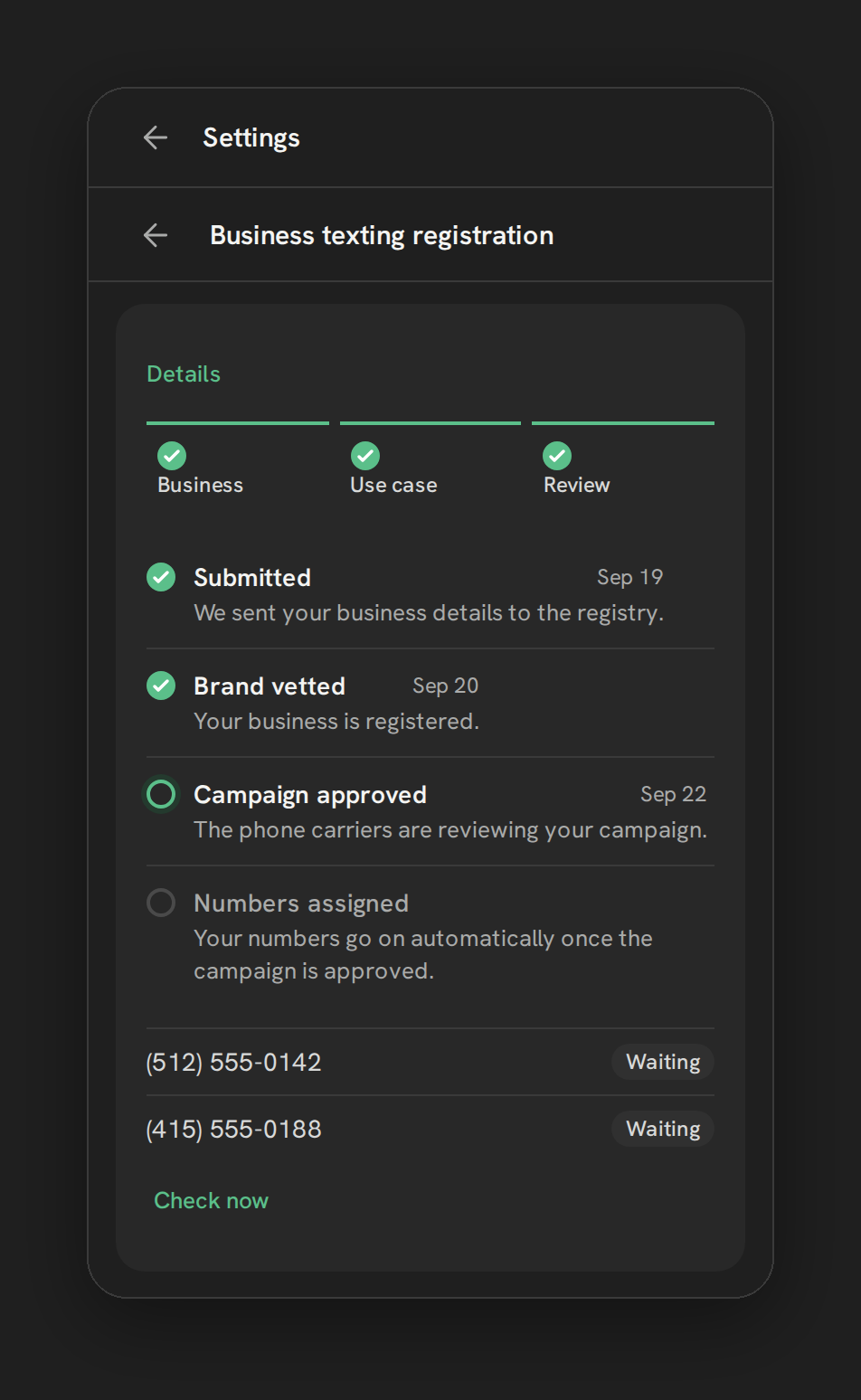
Phone Clover’s registration wizard, in Settings under the Texting tab, breaks the process into a strip of steps instead of one long form:
- Business - your legal business identity, including a 9-digit EIN. Phone Clover stores only the last 4 digits once registration completes, not the full number.
- Use case - what you text customers about and why, 2 to 5 example messages, your opt-in method, and how you handle a customer replying HELP.
- Review - a timeline of where the registration stands, with a Fix and resubmit button if a step gets rejected, a per-number Registered or Waiting chip, and a Check now link to refresh status.
- Toll-free - shown only if the sub-account has a toll-free number, with its own separate verification form.
Breaking the form into named steps does not change what the carriers ask for. What it changes is how easy it is to see which step failed and fix just that part, instead of resubmitting an entire application because one field was off.
Warning: Phone Clover cannot make TCR or the carriers approve a campaign faster. Nobody who builds on top of these carriers controls that timeline, and any claim otherwise is not honest. Treat registration as a process that takes real business days, not minutes.
Costs to expect
Pricing for A2P 10DLC registration flows through to whatever carrier processes it, in this case Telnyx. As a rough, non-guaranteed reference: brand registration is typically a few dollars one-time, campaign registration runs around $10 a month (often billed a few months ahead) plus a one-time carrier review fee, and optional additional vetting costs more. Toll-free verification is usually free but can take one to two weeks. Treat any number you see quoted, including these, as a reference point to verify at the time you register, not a fixed price list.
A2P 10DLC versus toll-free verification
Agencies juggling both 10-digit and toll-free numbers across clients often mix these two processes up, and they are not the same thing:
| A2P 10DLC | Toll-free verification | |
|---|---|---|
| Applies to | Regular 10-digit local numbers | Toll-free numbers (800, 888, etc.) |
| Registered with | The Campaign Registry (TCR), via brand and campaign | The toll-free carrier network directly |
| Typical cost | Brand fee plus a monthly campaign fee | Usually free |
| Typical timeline | Days for brand, longer for campaign review | Historically 4 to 6 weeks natively on GHL, with opaque rejection reasons |
| Where in Phone Clover | Business and Use case steps | The separate Toll-free step, shown only if the sub-account has a toll-free number |
If a sub-account mixes both number types, plan for both processes to run, and do not assume finishing one clears the other.
A simple registration checklist for agencies
Running this same process across many clients gets easier with a short, repeatable checklist before you ever open the wizard for a new sub-account:
- Confirm the legal business name and EIN match public records. A mismatch here is one of the more common reasons a brand step gets rejected.
- Write your use case and 2 to 5 sample messages before you start. Carriers want to see exactly what kind of texts a business plans to send and why; vague use-case text is a common cause of a campaign getting sent back for revision.
- Confirm your opt-in method. How does a customer end up subscribed to texts from this business? Website form, verbal consent at signup, an existing customer relationship? Have the answer ready.
- Decide your HELP-reply handling before submitting, since it is a required field on the Use case step.
- Check whether the sub-account has a toll-free number. If it does, budget separate time for toll-free verification, since it runs on its own timeline.
- Set a reminder to check status, rather than assuming silence means approval. The Review step’s per-number chip and the “Check now” link are there specifically so you are not guessing.
None of this shortcuts the carrier review itself. What it does is cut down on the back-and-forth that happens when a brand or campaign gets rejected for something that could have been caught before submission.
Post-registration monitoring
Getting approved is not the end of the job. Carriers keep scoring how your numbers behave after registration, and a healthy campaign can still slip if a number starts getting flagged. That is where the Texting tab’s other cards do the ongoing work:
- Number health shows a Delivered/Spam trend per number, plus whether STIR/SHAKEN signing is active. If a sub-account has two or more enabled numbers, an optional switch can pause a flagged number automatically and move texting to a healthier one until it recovers.
- Failed texts translates raw carrier error codes into plain categories, like blocked by a carrier or number not registered, so you are not guessing at what a bounce code means.
- The Overview tab’s “Needs attention” card surfaces any number sitting at risk, any hosted or international order still waiting on documents, or any registration still waiting on carrier review, so nothing sits quietly broken.
Registering once and never checking back is how agencies end up with a client’s texting silently degraded for weeks. The health tooling exists specifically so that does not happen unnoticed.
When Phone Clover fits, and when it does not
Phone Clover fits agencies running texting across multiple HighLevel sub-accounts who want a single guided flow for registration and ongoing number health, instead of juggling raw Telnyx or TCR forms per client. It also fits teams that have been hit by carrier filtering (error 30034 or 30033) and want a clearer picture of what is happening to a number after it is approved.
It does not remove the underlying carrier timeline. If you need same-day texting approval, nothing on the market, including Phone Clover, can promise that, because the carriers set that clock. And if you are only running a single sub-account with light texting volume, the manual forms inside Telnyx directly may be just as fast without adding another tool to your stack.
Related reading: Register for A2P 10DLC, Reading number health radar, Understanding failed text reasons, and the A2P/10DLC product page.