
AI transcripts and summaries
How Phone Clover creates AI call summaries: it picks up a recorded call, transcribes it, writes the summary, and skips what it cannot process.
For admins · Updated Nov 3, 2026
All guides
When recording and Transcribe and summarize are enabled, Phone Clover processes eligible recordings in the background. Results usually take a few minutes; they do not appear as soon as you hang up.
Which calls qualify
- The sub-account has an active plan that includes AI notes and an available account slot.
- Transcribe and summarize is enabled.
- A recording is available and its duration is known.
- The whole call fits within the remaining monthly allowance.
- New processing jobs are picked up for calls started within the last two days.
Calls shorter than 10 seconds, recordings larger than 20 MiB, and recordings that produce too little usable speech are skipped. Skipped and failed jobs do not use the customer’s included minutes.
Results and retries
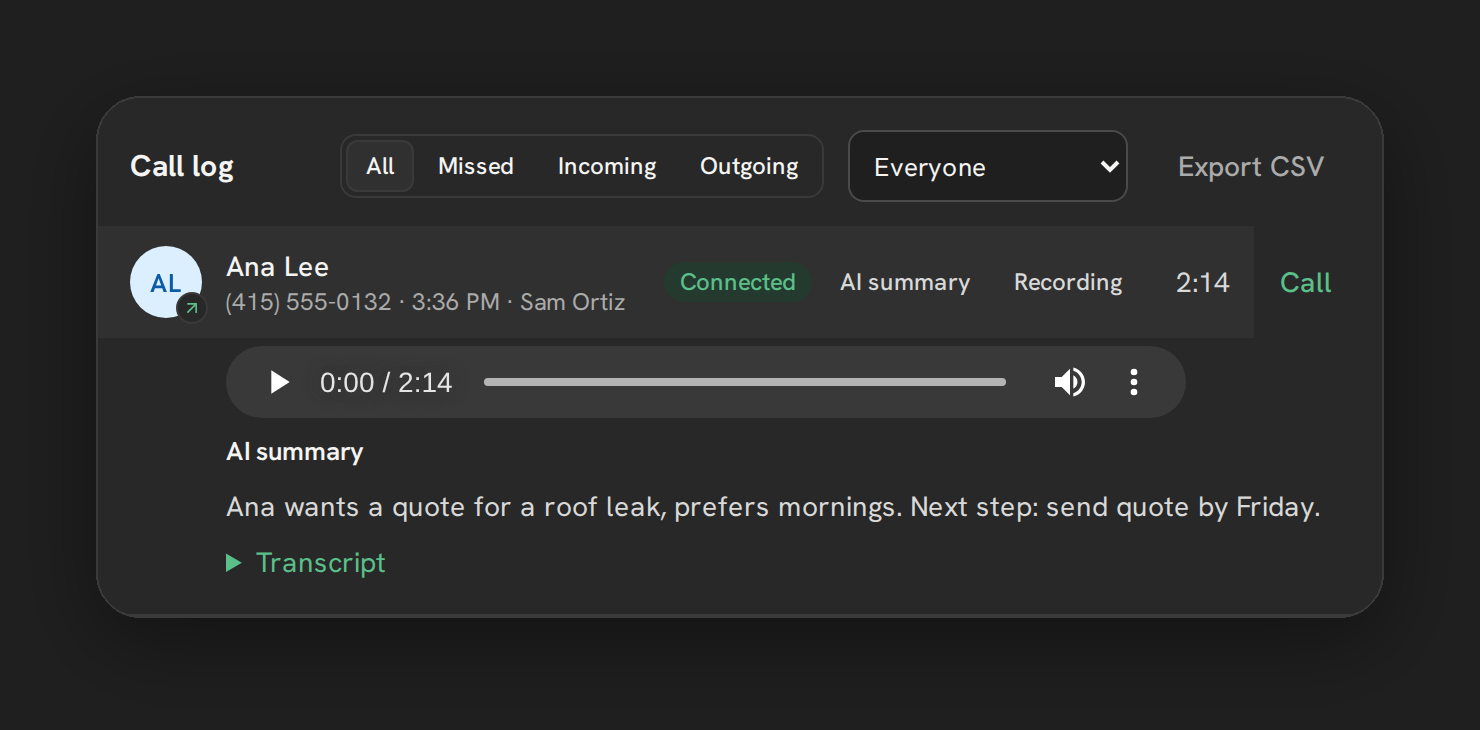
Phone Clover transcribes the recording, then generates a short summary and a suggested next step. The stored result appears with the call in the dashboard. A transcript excerpt of up to 4,000 characters and the summary are sent to the contact’s Notes in HighLevel.
Temporary processing failures retry automatically, with up to three processing attempts. Sending the result to HighLevel Notes retries separately, up to five attempts, without rerunning a successful transcription. A successful call is counted only once against the monthly allowance.
After the retry limit, a failed job needs investigation. Contact support with the sub-account and approximate call time; do not send API keys.
Monthly allowance
Pro, Growth 5, Growth 10 and Scale include 1,000 recorded-call minutes per covered sub-account each UTC calendar month. There is no pooling, rollover or automatic overage charge. Check Settings → Calls → Recording for usage and reset information.
Calls and recordings still work when AI minutes run out. A shorter recording may fit when a longer one does not. The two-day window for new jobs means you should not expect all older recordings to be processed after the allowance resets.
Common questions
What is an AI call summary?
An AI call summary is a short summary of a recorded call with a suggested next step, written from the call’s transcript after the call ends. It is added to the contact’s Notes in HighLevel and stored with the call in the dashboard. It needs a recording, a plan that includes AI notes and the Transcribe and summarize setting.
Can I get AI phone call summaries in HighLevel with Phone Clover?
Yes, on Pro, Growth 5, Growth 10 and Scale. Turn on recording and Transcribe and summarize in Settings → Calls → Recording; results usually take a few minutes. To compare ways of getting AI call summaries into HighLevel, see AI call summaries in GoHighLevel.
Troubleshooting
No transcript or summary. Confirm recording was enabled when the call happened, the recording is available, AI notes is enabled, and the plan has enough minutes. Check the duration and size limits above, then allow time for processing and retries.
The dashboard has a result but HighLevel Notes does not. Note delivery is a separate step and may still be retrying. If it remains missing, contact support.
The transcript is short or the summary is inaccurate. Quiet audio or a recording with little speech may produce no useful result. Treat AI notes as a reference and listen to the recording when accuracy matters.