
Read the dashboard metrics
The stat tiles, periods and call log that make up the Phone Clover dashboard on the full Phone page.
For everyone · Updated Sep 23, 2026
All guides
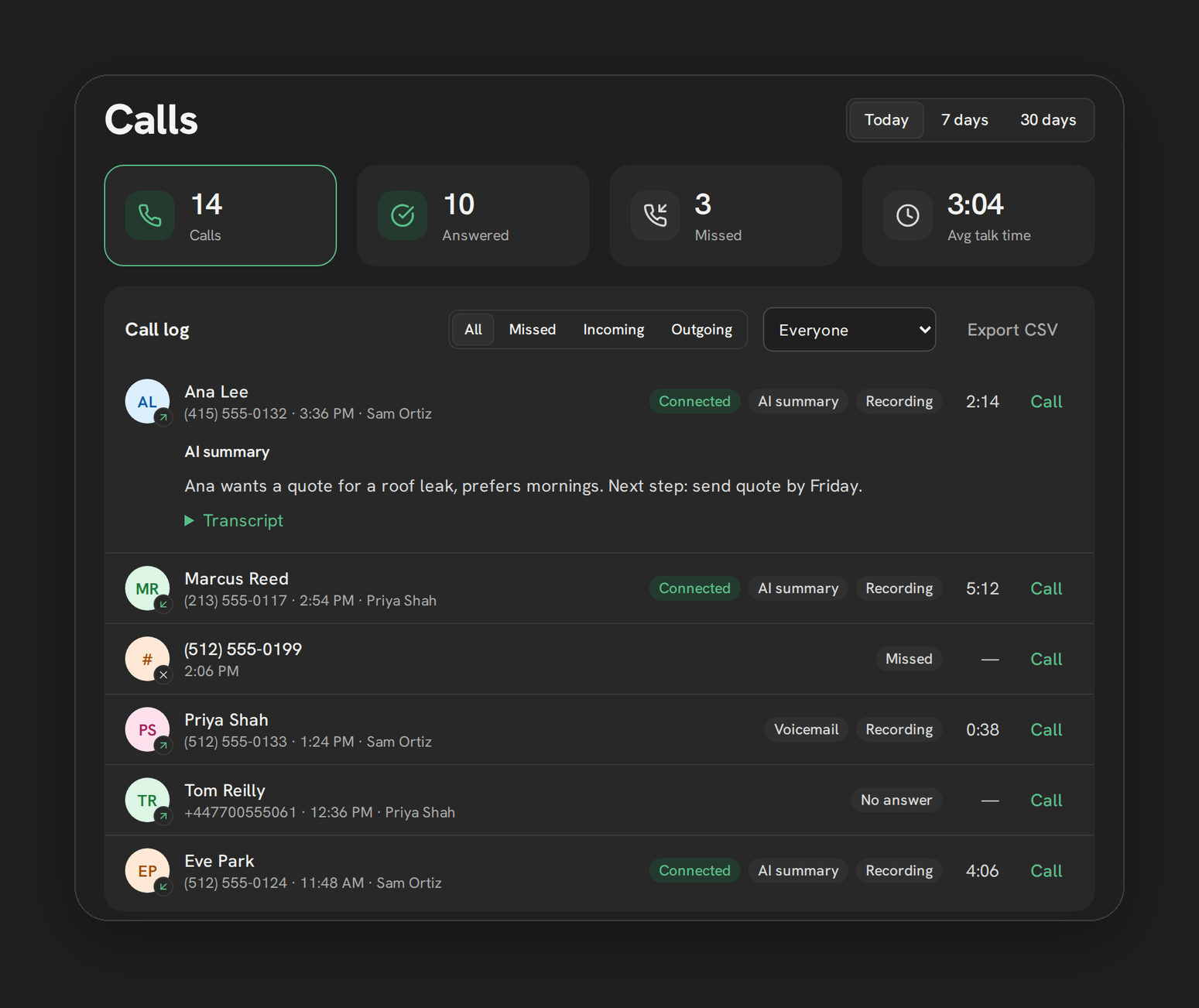
The dashboard is where you see how calling is actually going, without digging through individual calls one at a time. It sits next to the phone itself, not buried in a separate reporting section.
Where it lives
The dashboard, titled “Calls,” appears on the full, un-embedded Phone page when your browser window is at least 1000px wide. It shows as a second column next to the phone. Below 1000px wide, or inside the floating widget, the dashboard is not shown, so if you cannot find it, widen your browser window.
Periods
Three buttons switch the time range: Today, 7 days, 30 days. The longest lookback available anywhere on the dashboard is 90 days server-side, which applies to the underlying data even though the visible period buttons stop at 30.
Stat tiles
Four tiles summarize the selected period:
- Calls: total calls
- Answered: calls that connected
- Missed: calls that were not answered
- Avg talk time: average duration of connected calls
Clicking the Calls or Missed tile filters the call log below to match. See Call log filters for the full filter set.
Who sees what
A rep sees their own calls. An admin sees the whole sub-account, including calls nobody’s phone caught, for example a ring-all call that rang everyone and went unanswered.
What refreshes and when
The dashboard refreshes every 60 seconds, and immediately after any call is logged. A background refresh never rebuilds a row you already have expanded, so playing back a recording is not interrupted mid-play.
Note: Charts over time are not built yet. The dashboard shows point-in-time totals for the selected period, not a trend line.
Related cards
Beyond the stat tiles and call log, the dashboard also has:
- Call log filters and Export call log CSV
- By rep stats (admin only)
- Team presence (admin only)
- To call back list
- Call a tag
Limits
- No charts or trend graphs over time.
- Lookback is capped at 90 days server-side, even though the visible period buttons only go up to 30 days.
- The dashboard only shows once your browser window is 1000px or wider.
Troubleshooting
The dashboard is not showing at all. Widen your browser window past 1000px, or check that you are on the full Phone page rather than the floating widget, which never shows the dashboard.
A call I just made is not showing yet. Give it up to 60 seconds, or trigger a manual refresh by switching periods and back. The dashboard also refreshes immediately after a call is logged from this device.
The numbers look different from what I expected as a rep. As a rep you only see your own calls. An admin sees the whole sub-account’s totals, which will be higher.