
HighLevel Missed Call Text Back - Setup and Best Practices
HighLevel missed call text back 7 min read
How HighLevel missed call text back works in Phone Clover, why it is off by default, message examples, business-hours behavior, and how to track the follow-up.
- Best for
- A business that wants callers to hear something right after a missed call, and already works the dashboard's to-call-back list for real follow-up.
- Not for
- A team that needs the reply to appear as a normal SMS thread inside Conversations, since it only logs as a note on the contact today.
- The difference
- Off by default, and fires only once, after the full ring, forward, and voicemail chain has finished with no answer.
A missed call is a lead going cold in real time. HighLevel missed call text back closes that gap with an automatic message sent after a call rings through unanswered, so the caller hears something back even if nobody picked up. This guide covers when it helps, why Phone Clover ships it off by default, what to put in the message, how it behaves around business hours, and how to make sure a missed call actually gets a human follow-up afterward.
When missed-call replies help
Most missed calls are not spam. They are a lead, a customer, or a prospect calling at a moment nobody was available, and a large share of callers who get no answer and no follow-up simply call the next business on their list. An automatic text-back changes that dynamic in one specific way: it tells the caller you saw the call and you will follow up, without requiring a rep to be free the instant the phone rang.
It works best for businesses that get inbound calls outside of a rep actively watching the phone: service businesses fielding calls between jobs, small teams where everyone is sometimes on another line, or after-hours calls that still deserve an acknowledgment even if the real follow-up happens the next business day.
Why Phone Clover keeps it off by default
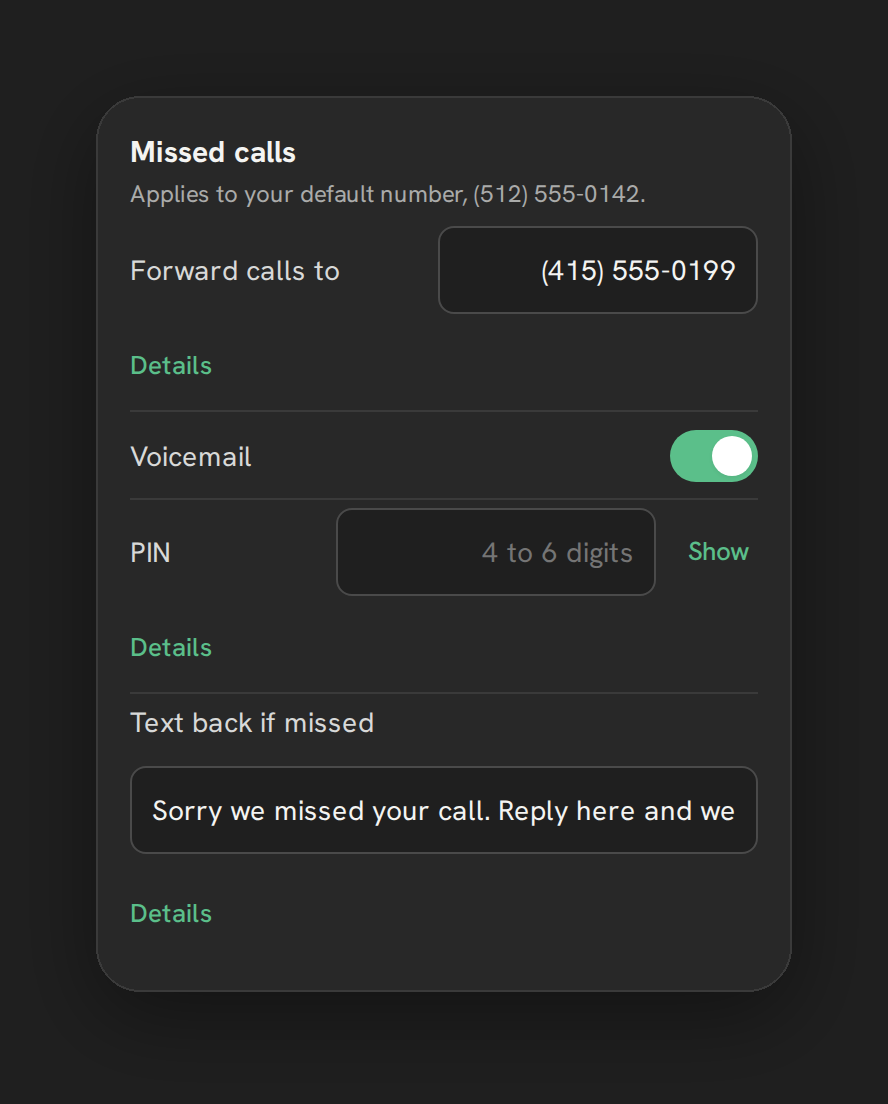
Phone Clover does not turn this on automatically when you install it. An admin has to opt in from Settings, under the Calls tab, in the “Missed calls” card. The control is a single text field labeled “Text back if missed” that doubles as the on/off switch: leave it blank (placeholder “No text (off)”) and nothing sends; type a message and it turns on.
That is a deliberate choice. Automatic outbound texting is customer-facing behavior a business should decide on purpose, with wording they have reviewed, rather than a default message going out under a business’s name the moment an app is installed.
Warning: The text-back message currently lands as a note on the contact’s record in GHL, not as a message inside the Conversations thread. If a rep goes looking for it as a normal text exchange, they will not find it there. This is a limitation in how GHL exposes this behavior to outside apps, not something that will change with a setting.
Message examples
The field allows up to 300 characters. A message that works well is short, identifies the business, and sets an expectation:
- “Sorry we missed your call! This is [Business Name] - we’ll call you back shortly. Reply here if it’s urgent.”
- “Thanks for calling [Business Name]. We’re with another customer right now and will call you back within the hour.”
- “We missed you! A member of our team will reach out today. Call us back anytime at this number.”
Avoid making promises you cannot keep on response time, and avoid legal or medical claims in the message. Keep it close to what a rep would actually say if they picked up the phone thirty seconds later.
Business-hours behavior
The text-back only fires after the full ring, forward, and voicemail chain has finished with no answer, never before a forward attempt that might still be answered. That matters for how it interacts with business hours:
- During business hours, if ring-all or round-robin routing fails to reach any rep and the call falls through to forward or voicemail with still no answer, the text-back is the last thing that happens in that chain.
- Outside business hours, calls behave as if nobody is available: try forward, then voicemail, then a spoken greeting and hang up. The text-back still only fires once, at the true end of that chain.
Because it always fires last, a caller who does get a real person on the second forward attempt, for example, will not receive the automatic text. It is reserved for calls that genuinely got no human response.
How to turn it on
The setting lives in Settings, under the Calls tab, in the “Missed calls” card, right next to forward-to-mobile and voicemail:
- Open Settings > Calls > Missed calls.
- Find the “Text back if missed” field.
- Type your message, up to 300 characters. The field starts with placeholder text reading “No text (off).”
- The change saves automatically once you move away from the field. There is no separate Save button for this particular setting.
To turn it back off later, clear the field. Phone Clover will ask you to confirm first, with a message along the lines of “Stop texting back missed callers? Nobody will hear from you automatically,” since this is a real behavior change for anyone who calls in after that.
How it fits with the rest of missed-call handling
Text-back is one piece of a larger missed-call setup, not a standalone feature. The same “Missed calls” card also controls forward-to-mobile and voicemail, and all three interact:
- If forward-to-mobile is on and a rep answers on their cell, the call was answered, so no text-back fires. Your Telnyx number is always kept as caller ID on a forwarded call; it is never swapped out for the rep’s personal number.
- If voicemail is on and the caller leaves a message, the call still counts as unanswered for text-back purposes, since nobody picked up live. The text-back and the voicemail can both apply to the same missed call.
- If neither forward nor voicemail is configured, an unanswered call outside business hours falls to a spoken text-to-speech greeting and a hang up, and text-back still fires afterward if it is turned on.
Think of text-back as the layer that always runs last, regardless of which combination of forwarding and voicemail a sub-account has configured.
A note on tone and compliance
Because this message sends automatically and immediately, it is worth treating the wording with the same care you would give any other automated business communication. A few practical guidelines:
- Identify your business by name in the message, since the caller may not have your number saved.
- Do not promise a specific response time you cannot reliably meet (“we’ll call you back in 5 minutes” during a busy period sets an expectation you may break).
- Avoid sensitive claims. If you are in a regulated industry, medical, legal, financial, run the wording by whoever handles compliance for your business before turning this on.
- Keep it short. The 300-character cap forces this anyway, but a shorter message reads less like an automated form letter.
Follow-up tracking
Sending an automated text is not the same as following up. The real fix for a missed call is still a human callback, and Phone Clover’s dashboard is built around making sure that happens:
- The “To call back” card lists missed calls from the last 7 days that nobody at the sub-account has since called or answered, capped at 20 rows, each with a Call back button.
- The Recents tab on the Phone page shows a red missed-call badge and lets you filter to Missed specifically, so a rep opening the app sees what needs attention first.
- Logging an outcome after the eventual callback, including a custom outcome with a follow-up task, keeps the record of what happened attached to the contact.
Text-back buys you time. The to-call-back list and outcomes are what close the loop.
Measuring whether it is working
Since the reply lands as a contact note rather than a trackable Conversations message, you cannot measure text-back the way you might measure an SMS campaign, with open or reply rates pulled straight from a thread. What you can measure instead:
- Whether missed calls are getting worked. The to-call-back list is the real signal. If it stays empty or gets cleared daily, follow-up is happening regardless of whether the automatic text played a role.
- Whether callers mention it. Some businesses find that customers reference the text-back message when they do get a live callback (“got your text, just calling back”), which is a loose but real signal it is being seen.
- Complaint volume. If customers start replying with confusion or annoyance, that is a strong signal to revisit the wording, since a note-based reply cannot easily continue a two-way conversation the way a real Conversations thread would.
A word on expectations versus reality
It is worth being blunt about the current limitation one more time, because it shapes how you should message this internally to your team: reps will not see the automatic text-back reply sitting in Conversations next to a customer’s other messages. If a customer replies to that text, the reply comes back into Conversations normally, but the outgoing text-back itself only shows as a note on the contact. Set that expectation with your team before turning this on, so nobody assumes they will find a full two-way thread documenting the automated reply itself.
When Phone Clover fits, and when it does not
Missed-call text-back in Phone Clover fits a business that wants callers to hear something immediately after a missed call, and is comfortable that the reply shows up as a note on the contact rather than a Conversations message today. It fits teams that already use the dashboard’s to-call-back list to make sure a real person follows up afterward, not just the automatic text.
It does not fit a team that needs the reply to appear as a normal SMS thread a rep can continue texting in from Conversations, since that is not how it works today. And it is not a replacement for staffing the phone during your busiest hours. An automatic text buys goodwill, it does not close the sale.
Related reading: Set up missed-call text-back, Configure business hours, Work the to-call-back list, and the missed-call text-back product page.